Google Explains How to Move Chat History From Other AI Apps Into Gemini
Preferences transfer by pasting in a summary written by your old AI, while chat history moves as a ZIP file upload. Google says you can resume conversations from where you left off.
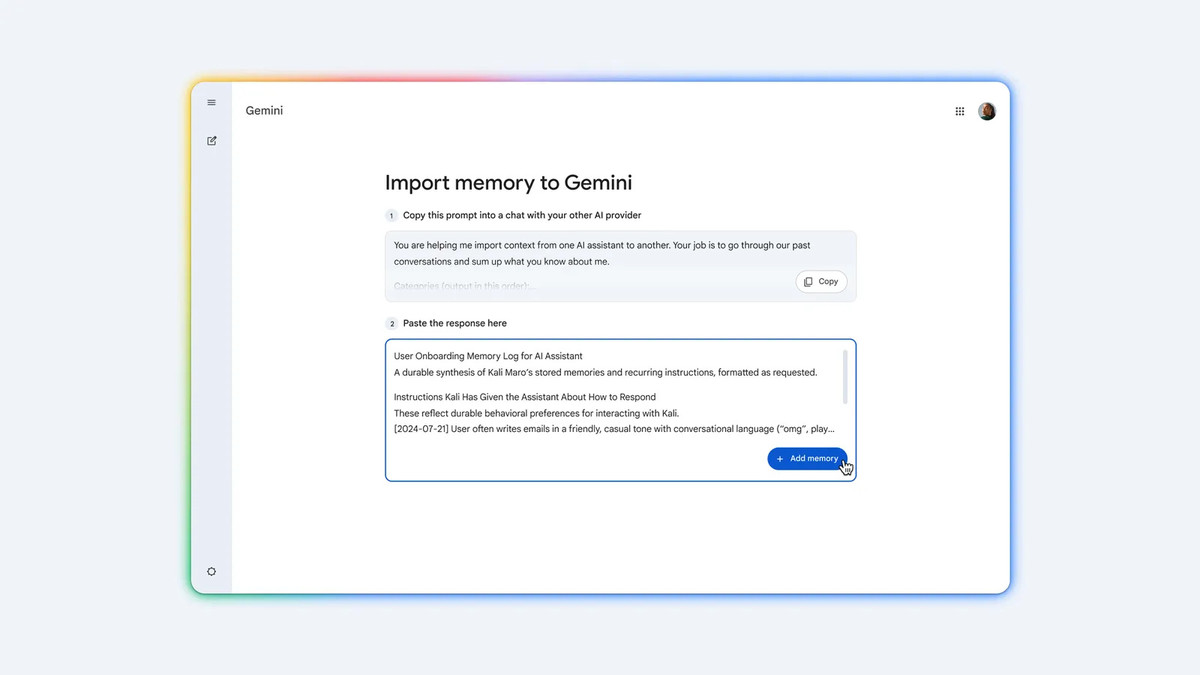
Google on November 19 (local time) laid out how to bring your preferences and chat history from other AI apps over to Gemini. The company said that transferring the context you built up with a previous AI lets you pick up the conversation in Gemini without having to explain everything from scratch.
Preferences move over in three steps. First, copy the prompt (the instructions you give an AI) from Gemini’s import settings. Paste it into the AI you were using before and let it summarize your preferences. Then paste that response back into Gemini, and you’re done. Rather than having users rewrite each setting by hand, the approach hands the summarizing job to the AI they already use.
Chat history moves over as a file. In the account settings of your previous AI service, export your chat history as a ZIP archive. Then upload that file in Gemini’s settings. Google said that following this process lets you resume conversations from where you left off.
Source: Google blog
If you’re considering a switch, it’s worth first checking whether your current service even allows you to export your history. How much the transferred history and preferences actually show up in your conversations is another thing to test for yourself.